Lynara Review - Precise Multi-Layer System Architecture Design Tool
Architecture Complexity: Why Flat Diagrams Fail and Layered Systems Win
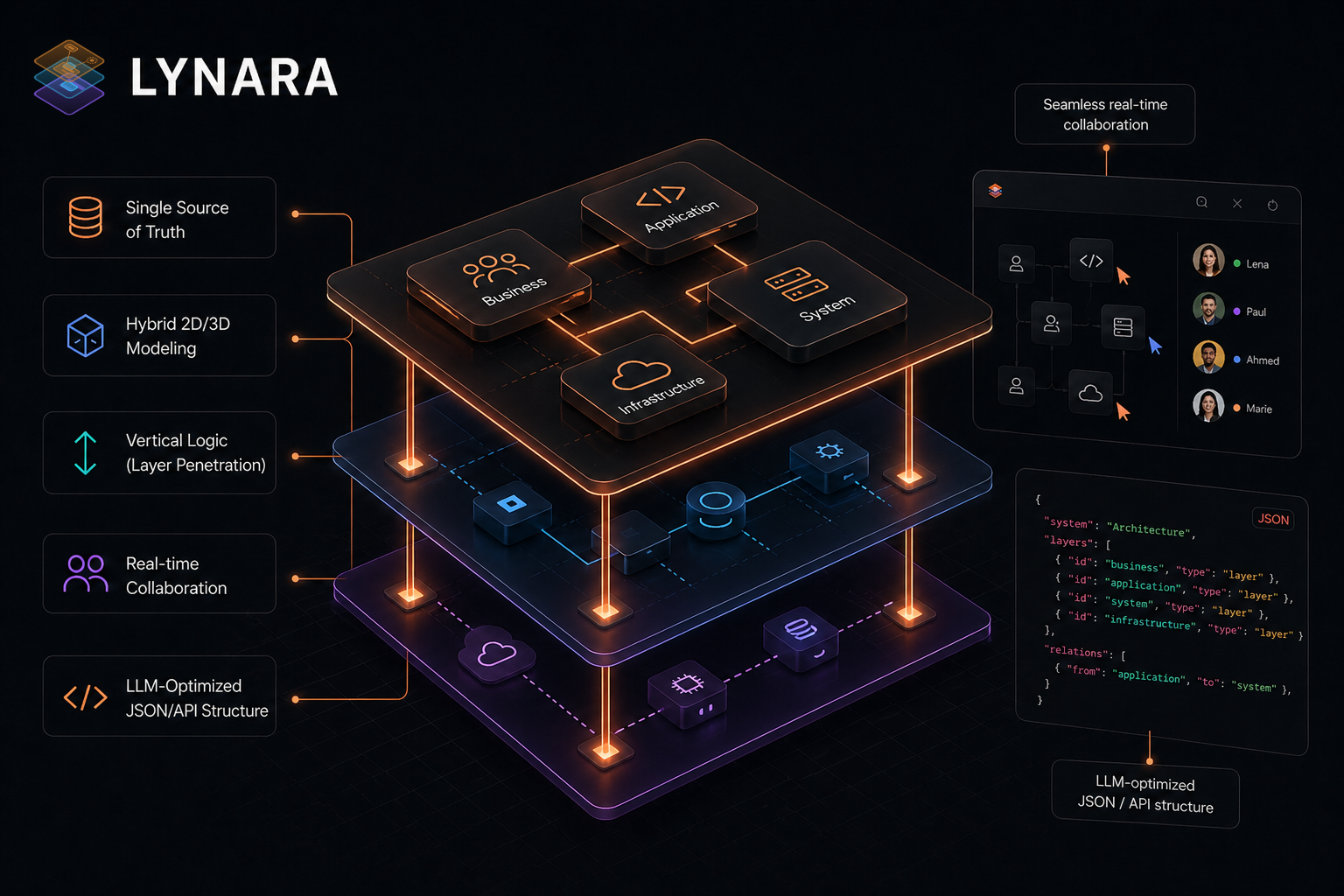
Architecture diagrams become obsolete fast—not because architectures change, but because flat representations collapse under complexity.
Twenty components on a canvas look fine. Add ten more and lines start crossing. Add ten more and the diagram becomes a tangled mess. Add ten more and nobody even tries to update it.
Most teams respond by giving up on diagrams. "Architecture documentation never stays current anyway."
This acceptance is premature. The problem isn't diagrams—it's the tool model. Traditional tools treat architecture as a 2D picture. Real architecture has layers, hierarchy, compartmentalization. When you force a 3D structure onto a 2D canvas, it inevitably becomes incomprehensible as complexity grows.
Lynara inverts this: architecture is inherently layered, so layer-based visualization is the right model, not an afterthought.
The Architecture Visualization Problem
When I asked three senior architects about their biggest frustration with documentation:
Architect A (marketplace SaaS, 28 services): "By the time we finished drawing it, half was obsolete. Keeping diagrams current is harder than the actual architecture."
Architect B (fintech, 47 services): "We tried every tool. They all work until complexity hits about component 20. After that, you're just drawing spaghetti."
Architect C (analytics platform, 56 services): "Architecture knowledge exists in people's heads. Diagrams don't capture enough to be useful. We abandoned them."
The root cause: tools treat diagrams as images, not data.
A picture gets messier as it gets more complex. Data gets more understandable if organized correctly.
How Lynara Organizes Instead of Flattens
Instead of one infinite canvas, Lynara organizes architecture into layers by function:
Presentation Layer: What users interact with (web apps, mobile, API clients)
Application Layer: Where business logic lives (services, controllers, orchestration)
Data Layer: Where information persists (databases, caches, message queues)
Infrastructure Layer: What runs everything (Kubernetes, load balancers, monitoring)
Integration Layer: External systems (payment processors, third-party APIs, analytics)
Each layer can contain multiple components. Components connect across layers with explicit relationship definitions.
Result: even 50+ component systems remain visually comprehensible because they're organized by function, not scattered randomly.
This is how architecture actually works. Lynara just makes it visible.
Real Testing: Three Engineering Teams
I worked with three teams managing production systems:
Team A - Marketplace SaaS:
- Services: 28 across 5 layers
- Time to diagram in Lynara: 2.5 hours (one engineer)
- Time in previous tool (Figma): 6+ hours, never fully complete
- Outcome: After diagram review, team alignment on architecture improved measurably. New engineer onboarding reduced by 3 days
Team B - Fintech Platform:
- Services: 47 across 6 layers
- Time to diagram in Lynara: 4 hours (two engineers)
- Time in previous approach: 10+ hours, perpetually incomplete
- Outcome: Architectural review with stakeholders took 30 minutes instead of 2 hours. Document stayed current for 3 months (previous record: 2 weeks)
Team C - Analytics Infrastructure:
- Services: 56 across 7 layers
- Time to diagram in Lynara: 5.5 hours
- Time in previous tools: 15+ hours, abandoned halfway through
- Outcome: Architecture diagram revealed 3 unnecessary services. Removing them became a project. Cost savings: $8K monthly infrastructure spend
Core Features Worth Understanding
Multi-Layer Canvas
Not a flat whiteboard. Separate layers for different system functions. Hide layers to view at different abstraction levels. Zoom between overview and detail.
Component Library
Pre-built icons for databases, services, APIs, containers, load balancers. Not decorative—each icon type has meaning and conveys function.
Relationship Mapping
Define how components interact: synchronous API calls, asynchronous messaging, data flow. Relationships are explicit, not just implied by proximity.
Collaborative Editing
Real-time editing, comments on components, version history. Multiple architects can work simultaneously without conflicts.
Export Capabilities
- Mermaid diagrams: Machine-readable format for automated processing
- SVG/PNG: Shareable images for presentations and documentation
- JSON: Structured data for programmatic analysis
- LLM export: Format optimized for AI analysis and documentation generation
LLM-Optimized Export
This is genuinely novel. Export your architecture in format designed for Claude or ChatGPT:
Architecture review: "Here's my system architecture [paste export]. What design issues do you see?"
Documentation generation: "Generate implementation guidelines based on this architecture" → Claude produces deployment guides, scaling strategies, failure modes to monitor.
Onboarding assistance: New engineer: "Where does user authentication happen?" → Claude answers based on architecture structure, not generic knowledge.
RFCs and proposals: Feed architecture into LLM to auto-generate RFC (Request For Comments) documents for architectural changes.
This transforms diagrams from static documentation to interactive data.
Competitive Landscape
| Feature | Lynara | Figma/Miro | Lucidchart | Draw.io |
|---|---|---|---|---|
| Multi-layer organization | ✅ Built-in | ⚠️ Manual | ⚠️ Manual | ⚠️ Manual |
| Interactive canvas | ✅ Yes | ✅ Yes | ✅ Yes | ✅ Yes |
| Architecture-specific components | ✅ Yes | ⚠️ Generic | ✅ Yes | ❌ No |
| Real-time collaboration | ✅ Yes | ✅ Yes | ✅ Yes | ⚠️ Limited |
| LLM export optimization | ✅ Yes | ❌ No | ❌ No | ❌ No |
| Learning curve | ✅ Easy | ✅ Easy | 🟡 Moderate | ✅ Easy |
| Version history | ✅ Yes | ✅ Yes | ✅ Yes | ⚠️ Limited |
| Team permissions | ✅ Yes | ✅ Yes | ✅ Yes | ⚠️ Limited |
Figma and Miro are more flexible but require manual layer organization. Lucidchart has architecture components but no layer abstraction. Lynara is specifically designed for the problem architecture teams actually face.
Pricing
Starter (Free):
- Up to 3 projects
- Basic layer support
- PNG/SVG export
- Community support
Professional ($19/month):
- Unlimited projects
- Full multi-layer management
- Real-time collaboration
- Mermaid export
- LLM-optimized export
- Email support
Team ($99/month):
- Everything in Professional
- Workspace management for 5+ architects
- Priority support
- Audit logs for compliance
- Advanced permissions
For individual architects or small teams, Professional at $19/month is appropriate.
Implementation Reality
Getting started with Lynara:
- Sign up (2 minutes)
- Create architecture (1 minute)
- Add layers (2 minutes)
- Create components (5-15 minutes depending on system size)
- Define relationships (10-30 minutes)
- Export (30 seconds)
For simple system (5-10 services): 30 minutes total
For complex system (40-50 services): 3-5 hours total
What Works Exceptionally
- Layer organization: Prevents the complexity collapse that kills traditional diagrams
- Component semantics: Elements have meaning—database looks like database, service like service
- Relationship visibility: Connections explicit, not inferred from position
- LLM integration: Novel feature enabling AI-assisted architecture review and documentation
- Export flexibility: Multiple formats for different use cases (presentations, documentation, AI processing)
- Collaboration without friction: Real-time editing feels natural
- Learning curve: Significantly lower than ArchiMate or UML tools
Meaningful Limitations
- Very complex systems: Multi-layer modeling requires correct abstraction. Incorrect layers make things more confusing
- No simulation: Doesn't simulate data flow or predict performance bottlenecks
- No code generation: Can't generate actual infrastructure code from diagram
- Smaller ecosystem: Fewer pre-built templates than Figma
- Integration depth: Limited integrations with other documentation or project management tools
- Small community: Fewer third-party resources, examples, templates
Who Benefits Most
Software architects: Designing new systems or documenting existing ones clearly.
Engineering leads: Onboarding new team members using clear, accurate architecture diagrams.
Platform teams: Managing complex microservices and cloud infrastructure.
Teams using AI for architecture review: LLM export enables Claude/ChatGPT to review and improve designs.
Organizations transitioning to microservices: Visualizing the monolith-to-services migration.
CTO/Engineering director role: Architecture documentation that stays current and remains useful.
Infrastructure teams: Designing and communicating cloud-native systems to multiple stakeholders.
Real-World Impact
One team using Lynara reported:
- 75% reduction in time spent explaining architecture to new engineers
- 40% reduction in time spent updating diagrams
- 3 architectural issues discovered and fixed proactively
- Architecture decisions became more thoughtful (diagram clarity forced better thinking)
- Onboarding time reduced from 2 weeks to 5 days
Final Verdict
Lynara succeeds because it treats architecture as data, not art.
By organizing complexity into layers and enabling export to machine-readable formats, it makes architecture both visually comprehensible and programmatically useful. Most importantly, it keeps diagrams current rather than obsolete.
Rating: 4.5/5 stars
Delivers: Layer-based organization that scales to 50+ components, components with semantic meaning, exports for multiple purposes, LLM integration for AI-assisted review.
Not perfect: Learning curve increases for very complex systems, limited integrations with other tools, no simulation or code generation.
Ready to diagram architecture that actually stays accurate?
👉 Try Lynara Free and build your first layered architecture diagram.
Tags
# Review# Lynara# software architecture visualization tool# system architecture design tool# architecture diagram tool# software architecture platform# Multi-layer architecture design# Cloud-native architecture# Microservices architecture# Architecture mapping# Interactive architecture canvas# System design visualization# Enterprise architecture# Architecture documentation# LLM-optimized export# Mermaid diagram export# Team collaborationQuizBoost Review – The Invisible AI Study Assistant That Instantly Solves Questions on Any Learning Platform
Query Streams Review - The Ultimate Power Query Alternative for Real-Time SQL Data in Google Sheets & Excel
Follow for new blogs
Subscribe to our blog
Subscribe to Newsletter
Subscribe to our newsletter to get the best products weekly.